How to find VDI Client (ThinClient) MAC address from Horizon View


      While administering VDI environments, most of the time we will struggle to get Thin Client or VDI Client MAC address for troubleshooting, re-imaging or for providing remote shadow support. Below article explains about a simple “visual basic” script to get this information. In my case, I kept this script on network share and configured a Desktop shortcut on all VDI machines.
       When a user connects or reconnects to a View desktop, Horizon Client gathers information about the client system and View Connection Server sends that information to the remote desktop.
       View Agent writes the client computer information to the system registry path “HKEY_CURRENT_USER\Volatile Environment” on VDI desktops.
Registry values:
 
ViewClient_MAC_Address
ViewClient_IP_Address
Below script will read the HKEY_CURRENT_USER\Volatile Environment\ViewClient_MAC_Address registry parameter and will give Visual Basic output as below screenshot.
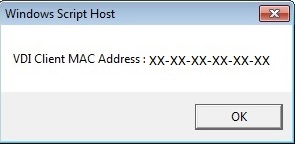
”#### VBS Script ####”
On Error Resume Next
Dim objShell, strTemp
Set objShell = WScript.CreateObject(“WScript.Shell”)
strTemp = “HKEY_CURRENT_USER\Volatile Environment\ViewClient_MAC_Address”
WScript.Echo “VDI Client MAC Address : ” & objShell.RegRead(strTemp) 
”### END ####”

You might be interested in …

VMware PowerCLI Connect-VIServer Error: Invalid server certificate. Use Set-PowerCLIConfiguration

VMware

    Problem:   Unable to connect vCenter with  “Connect-VIServer” command. It gives error “VMware PowerCLI Connect-VIServer Error: Invalid server certificate. Use Set-PowerCLIConfiguration“       Reason:   The issue usually happen whenever Self Signed Certificate is used in Vcenter server.     Solution:   Execute below command to ignore Certificate check during vCenter Connection. […]

Read More

Install and configure VMware PowerCLI version 10

Home, VMware

VMware PowerCLI is a collection of Windows Powershell modules that are used to manage and maintain a VMware virtual environment. VMware PowerCLI contains modules of cmdlets based on Microsoft PowerShell for automating vSphere, VMware Site Recovery Manager,vSphere Automation SDK, vCloud Director, vCloud Air, vSphere Update Manager, vRealize Operations Manager, VMware Horizon, NSX-T, and VMware Cloud on AWS administration. VMware PowerCLI provides a PowerShell interface to the VMware product […]

Read More

NTP configuration on multiple ESXi hosts via PowerCLI

VMware

As you might know, keeping our ESXi hosts’ date and time accurate is very critical. To prevent having an inaccurate time configuration we can use the NTP server in our environment.A few days ago, I faced a question about NTP configuration in the vSphere environment and how to set NTP configuration on many ESXi hosts. […]

Read More

Leave a Reply

Your email address will not be published. Required fields are marked *