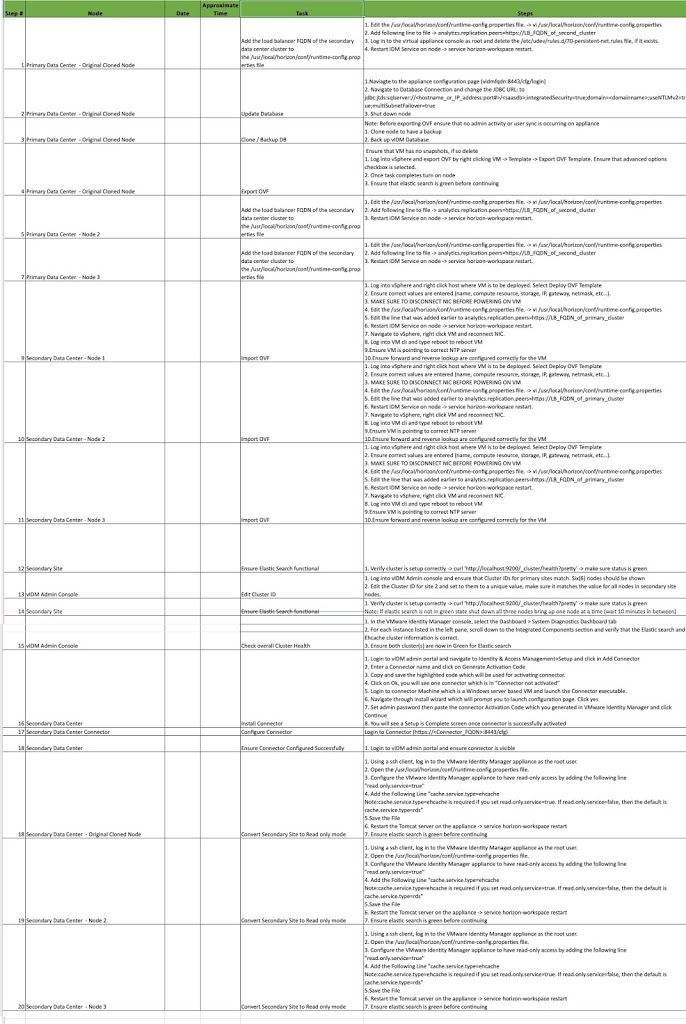
Workspace ONE Access Multisite Tasks – One Pager

For the past few weeks, I have been working with my project team and my customer to help them stand up VMware Access on a secondary site. With the help of Haseeb Waseem, I have created a single spreadsheet which includes all the major steps needed to create a secondary site.

Hope this is helpful to others. Here is the direct link for the spreadsheet.

[table id=1 /]


You might be interested in …

Duplicate “ViewClient_Client_ID” and Multi Session issues on Horizon View

Horizon View, VMware

Multi-Session Issue on VMware Horizon View Due to Duplicate “ViewClient_Client_ID”   Problem:              When we enable the “Allow multiple sessions per user” settings in VDI Pool, a user that connect from different client devices receive different desktop sessions. To reconnect to an existing desktop session, user must use the same […]

Read More

Configure App Volumes Manager

AppVolumes, VMware

In my previous post we installed the App Volumes Manager. Now it is time for it’s configuration. In this post I will show you the basic configuration to start of with App Volumes. Before we start make sure you have a Service Account ready for App Volumes. During the configuration, you will need this account to […]

Read More

How to find VDI Client (ThinClient) MAC address from Horizon View

Horizon View, VMware

        While administering VDI environments, most of the time we will struggle to get Thin Client or VDI Client MAC address for troubleshooting, re-imaging or for providing remote shadow support. Below article explains about a simple “visual basic” script to get this information. In my case, I kept this script on network […]

Read More

Leave a Reply

Your email address will not be published. Required fields are marked *