How to find VDI Client (ThinClient) MAC address from Horizon View


      While administering VDI environments, most of the time we will struggle to get Thin Client or VDI Client MAC address for troubleshooting, re-imaging or for providing remote shadow support. Below article explains about a simple “visual basic” script to get this information. In my case, I kept this script on network share and configured a Desktop shortcut on all VDI machines.
       When a user connects or reconnects to a View desktop, Horizon Client gathers information about the client system and View Connection Server sends that information to the remote desktop.
       View Agent writes the client computer information to the system registry path “HKEY_CURRENT_USER\Volatile Environment” on VDI desktops.
Registry values:
 
ViewClient_MAC_Address
ViewClient_IP_Address
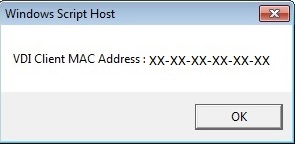
Below script will read the HKEY_CURRENT_USER\Volatile Environment\ViewClient_MAC_Address registry parameter and will give Visual Basic output as below screenshot.
”#### VBS Script ####”
On Error Resume Next
Dim objShell, strTemp
Set objShell = WScript.CreateObject(“WScript.Shell”)
strTemp = “HKEY_CURRENT_USER\Volatile Environment\ViewClient_MAC_Address”
WScript.Echo “VDI Client MAC Address : ” & objShell.RegRead(strTemp) 
”### END ####”

You might be interested in …

Workspace ONE Access Multisite Tasks – One Pager

vIDM, VMware, Workspace ONE Access

For the past few weeks, I have been working with my project team and my customer to help them stand up VMware Access on a secondary site. With the help of Haseeb Waseem, I have created a single spreadsheet which includes all the major steps needed to create a secondary site. Hope this is helpful […]

Read More

Configure NSX-V Edge Load Balancer for Horizon

Horizon View, NSX, VMware

In this blog post I will walkthrough of how to create a load balancer VIP to balance traffic between VMware Connection servers. In the below case, I’ll configure an NSX edge to load balance traffic between my connection servers.           Step 1 : Deploy a NSX Edge In networking and Security, […]

Read More

Unified Access Gateway with Microsoft Azure AD Integration using SAML

Many customers are moving towards extending their Datacenter workloads to the clouds, and Microsoft Azure is one of the partners that the VMware EUC team works very closely with. VMWare Unified Access Gateway, what we called “UAG,” is available in the Azure AD app gallery directly, reducing and simplifying the efforts of integration and configurations.  […]

Read More

Leave a Reply

Your email address will not be published. Required fields are marked *